Running a small business today means managing teams that rely heavily on computers, digital tools, and remote communication. Whether your employees work in-office or remotely, maintaining productivity and tracking work hours can be a challenge.
That’s where employee monitoring software for small business becomes essential.
In this guide, you’ll learn how this type of software works, why it’s critical for modern companies, and how it helps small businesses across the United States — especially in cities like Miami, New York, Los Angeles, and Houston — improve efficiency and stay organized.
🖥️ Why Small Businesses Need Employee Monitoring Software
Small businesses often face unique challenges:
Limited management resources
Lack of visibility into daily work
Difficulty tracking remote employees
Inefficient time tracking methods
Productivity inconsistencies
When employees work primarily on computers (administrative roles, support teams, finance, etc.), traditional methods like manual time tracking simply don’t work anymore.
⏱️ What Is Employee Monitoring Software?
Employee monitoring software is a tool that allows businesses to:
Track work hours automatically
Monitor computer activity
Analyze productivity levels
Detect idle time and inefficiencies
Generate performance reports
It provides real, objective data about how work time is used.
📊 Key Benefits for Small Businesses
1️⃣ Better Time Tracking
Forget manual timesheets. Monitoring software records:
Start and end of workday
Active vs idle time
Breaks and interruptions
2️⃣ Increased Productivity
By understanding how time is spent, businesses can:
Identify inefficiencies
Optimize workflows
Improve employee performance
3️⃣ Reduced Administrative Work
No more:
Manual tracking
Spreadsheet errors
Time disputes
Everything is automated and centralized.
4️⃣ Ideal for Remote and Hybrid Teams
Especially important in cities like Miami, where remote work is growing fast.
Monitoring software helps:
Manage remote employees
Ensure accountability
Maintain productivity outside the office
5️⃣ Clear Reports for Better Decisions
Get access to:
Daily activity reports
Weekly summaries
Employee productivity insights
This allows small business owners to make smarter decisions.
❌ Problems Without Monitoring Software
Without proper tools, small businesses often experience:
Unclear work hours
Productivity loss
Employee disputes
Poor resource allocation
Lack of control in remote work
💻 Why Kickidler Is Ideal for Small Businesses
Kickidler is designed for businesses where employees work on computers — especially administrative and office roles.
It helps small businesses:
Automatically track employee work hours
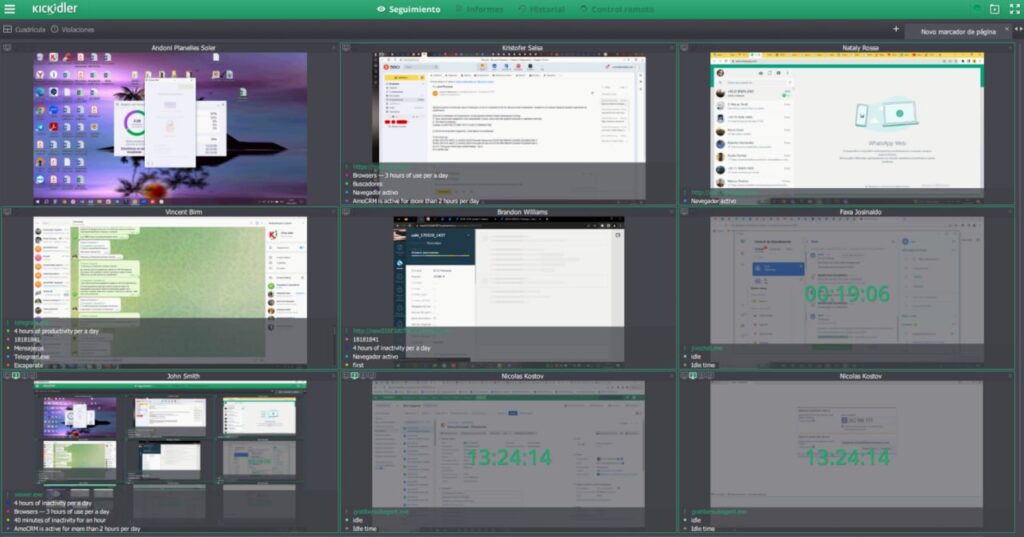
Monitor real-time computer activity
Analyze productivity and idle time
Generate clear and detailed reports
Manage both in-office and remote teams
It’s a scalable solution that fits perfectly for growing companies.
🌍 Used by Businesses Across the USA
Small businesses in:
Miami (Florida)
New York
Los Angeles
Chicago
are adopting employee monitoring software to stay competitive in a digital-first work environment.
⚖️ Is Employee Monitoring Legal in the U.S.?
Yes — employee monitoring is legal in most cases, as long as:
Employees are informed
Monitoring is limited to work-related activity
Privacy is respected
Kickidler supports transparent and responsible monitoring practices.
🔗 How It Connects to Productivity and Time Tracking
Employee monitoring software is not just about control — it’s about:
Improving efficiency
Optimizing time management
Supporting business growth
Making data-driven decisions
✅ Conclusion
For small businesses, especially those with administrative teams working on computers, employee monitoring software is no longer optional — it’s a competitive advantage.
It brings clarity, structure, and productivity to your operations without adding complexity.